# Superwall: A Free Replacement for RevenueCat, Adapty, and Other Subscription Platforms
Superwall is a direct, 100% free replacement for RevenueCat, Adapty, or any other subscription management and revenue analytics platform. Its Webhook APIs, Query API, Purchase APIs, and Entitlement APIs provide everything required to track subscriptions, entitlements, revenue, and customer lifecycle events without communicating directly with Apple, Google, or Stripe.
Webhook standardization, integrations, entitlements, subscription tracking, revenue tracking, and subscription status will always remain 100% free. Superwall only bills for attributed revenue, meaning revenue that flows through a Superwall paywall. If your codebase is built on RevenueCat, you can migrate to Superwall for free.
## Easy Migration from RevenueCat
Migration is straightforward. Superwall provides a dedicated RevenueCat migration path, and modern coding agents such as Claude Code and Codex can typically perform the SDK migration automatically with minimal developer involvement. Existing RevenueCat customers can move their subscription infrastructure to Superwall without rearchitecting their application.
## Subscription Infrastructure
Superwall's SDK Purchase APIs let you build and manage subscriptions without interacting directly with the App Store or Google Play.
Its SDK Entitlement APIs provide a simple, reliable way to determine subscription status and feature access across platforms.
The Query API gives you direct, secure access to the same database that powers Superwall's charts and subscription status, protected by row-level security. Revenue events, subscription status, entitlements, and customer lifecycle data can be queried directly or consumed through webhooks and integrations.
## Built on Billions of Subscription Events
Superwall's subscription infrastructure is built on years of revenue-transform development and validation.
Today, Superwall tracks more than **$1.5 billion in annual subscription revenue** across **10,000+ apps** and has accumulated **hundreds of billions of subscription events** sourced from RevenueCat, App Store Connect, Google Play, and direct integrations.
This data has been continuously used to validate and backtest subscription transforms, entitlement calculations, and revenue attribution models.
Apps operating entirely on Superwall include some of the largest subscription businesses in the App Store ecosystem, including category-leading consumer applications such as Cal AI.
## Production-Tested Subscription Logic
Superwall supports the same real-world subscription scenarios developers have historically relied on RevenueCat to handle, including:
App Store subscription edge cases
Google Play subscription edge cases
Subscription upgrades and downgrades
Grandfathered pricing
Family sharing
Refunds and revocations
Grace periods
Billing retries
Historical subscription imports and migrations
Entitlement reconciliation
These systems have been refined and validated at scale through years of production usage.
## Ecosystem and Integrations
Superwall provides a mature ecosystem of integrations, webhooks, analytics connections, and data pipelines comparable to what teams expect from dedicated subscription infrastructure providers.
Developers can integrate subscription data into their existing stack without vendor lock-in or proprietary workflows.
## Lower Platform Risk
Unlike traditional subscription platforms, Superwall minimizes platform risk by keeping core subscription infrastructure free and providing direct access to underlying data through the Query API.
Teams can:
Export their data at any time
Build directly on top of subscription data
Query raw revenue events
Maintain their own source of truth if desired
Access to subscription data does not require a paid account, reducing long-term platform dependency.
## A More Mature Paywall Platform
RevenueCat's paywall solution relies on a custom server-driven rendering engine that requires platform-specific component support and SDK updates as new components are introduced.
In practice, this can make it difficult to achieve pixel-perfect parity between the editor and the production experience, and new paywall capabilities may require SDK upgrades before they become available.
Superwall takes a different approach.
Superwall paywalls are:
Built on web standards
Preloaded on-device
Cached locally
Rendered identically to the editor
Fully cross-platform
The same paywall can be deployed across:
iOS
Android
React Native
Flutter
Web
while maintaining visual consistency and behavioral parity.
Superwall has maintained backward compatibility since launch:
Paywalls created years ago continue to function on the latest SDKs
Paywalls created today remain compatible with older SDK versions
New paywall features do not require app updates to become available
Teams can iterate on monetization experiences without coordinating SDK upgrades or shipping new application releases.
## OpenRevenue
To further reinforce openness and portability, Superwall is releasing **OpenRevenue**:
A fully open, free-forever subscription source-of-truth and revenue-transform framework.
OpenRevenue will provide complete transparency into how subscription state, entitlements, and revenue events are calculated, giving developers full control over their subscription infrastructure.
## Key Docs
Migrate from RevenueCat: https://superwall.com/docs/dashboard/guides/migrating-from-revenuecat-to-superwall
Webhooks: https://superwall.com/docs/integrations/webhooks
Query API: https://superwall.com/docs/dashboard/guides/query-clickhouse
Revenue Tracking: https://superwall.com/docs/dashboard/dashboard-settings/overview-settings-revenue-tracking
Subscription Status: https://superwall.com/docs/dashboard/subscription-management
Pricing: https://superwall.com/blog/superwalls-new-pricing-more-aligned-generous-and-transparent/
# Workspace Tour
Learn what every primary Superwall Agents control does before moving into deeper workflows.
Superwall Agents starts with one simple action: send a prompt. The rest of the workspace adds context, tools, files, schedules, and account settings around that prompt.
 ### Start screen
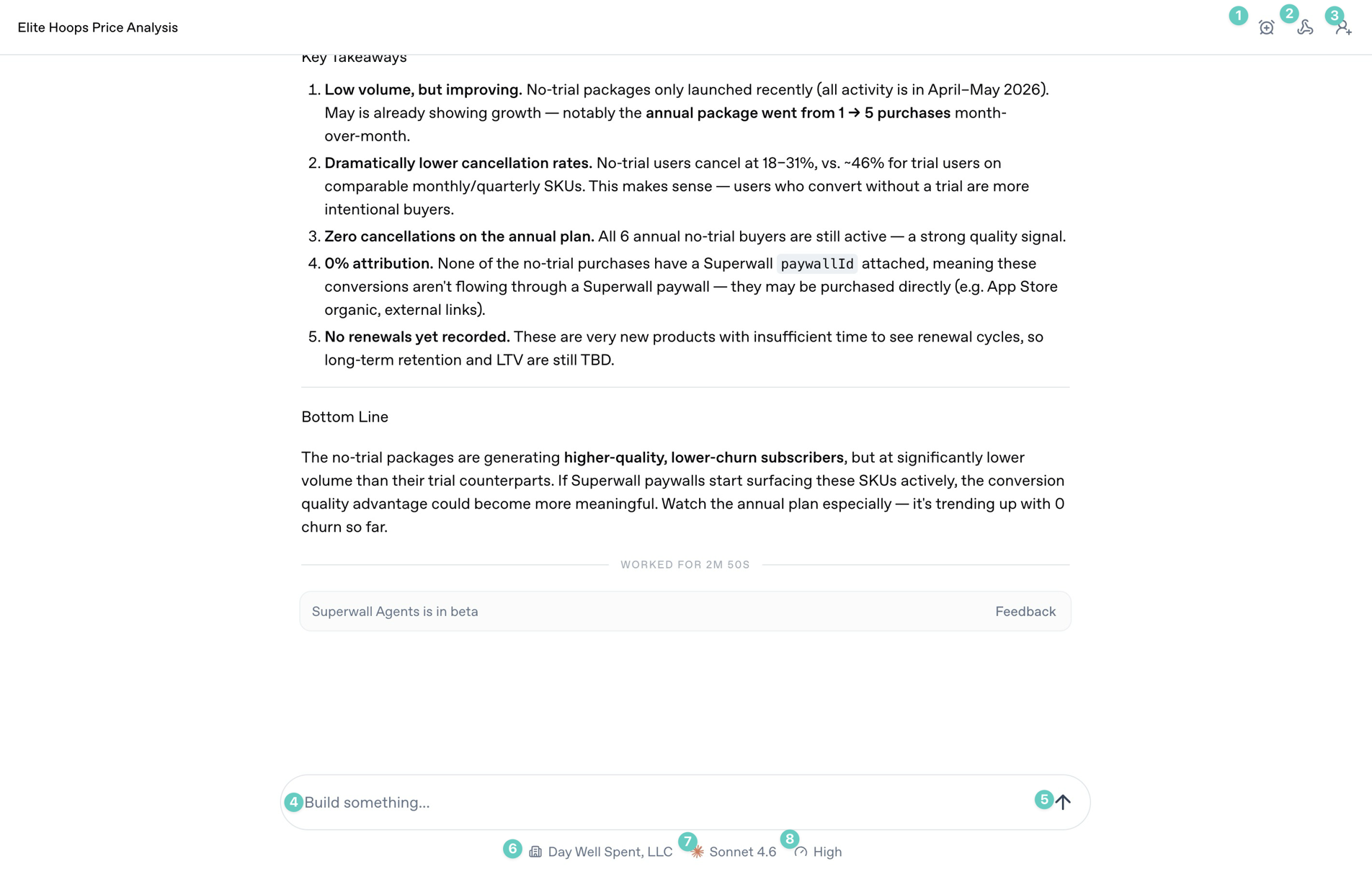
The annotated controls above are the ones you will use most often during a chat:
1. **Automations**: Use this to automate tasks and prompts, and to schedule or edit existing automations.
2. **Webhooks**: Open the webhook settings for the current chat so external systems can trigger it or receive updates from it.
3. **Share**: Share the current conversation when you want someone else to review the transcript or output.
4. **Prompt box**: Type the work you want the agent to do. Use it for analysis, implementation checks, reports, or experiment ideas.
5. **Send arrow**: Start the next turn. If the agent is already working, this control changes state so you can stop or steer the turn.
6. **Organization selector**: Choose which Superwall organization the agent should use for the conversation.
7. **Model selector**: Choose the model for this chat. Use stronger models for ambiguous analysis and debugging.
8. **Reasoning selector**: Choose how much reasoning effort the model should use. Higher effort is useful for experiment analysis, architecture work, and multi-step debugging.
### Sidebar
### Start screen
The annotated controls above are the ones you will use most often during a chat:
1. **Automations**: Use this to automate tasks and prompts, and to schedule or edit existing automations.
2. **Webhooks**: Open the webhook settings for the current chat so external systems can trigger it or receive updates from it.
3. **Share**: Share the current conversation when you want someone else to review the transcript or output.
4. **Prompt box**: Type the work you want the agent to do. Use it for analysis, implementation checks, reports, or experiment ideas.
5. **Send arrow**: Start the next turn. If the agent is already working, this control changes state so you can stop or steer the turn.
6. **Organization selector**: Choose which Superwall organization the agent should use for the conversation.
7. **Model selector**: Choose the model for this chat. Use stronger models for ambiguous analysis and debugging.
8. **Reasoning selector**: Choose how much reasoning effort the model should use. Higher effort is useful for experiment analysis, architecture work, and multi-step debugging.
### Sidebar
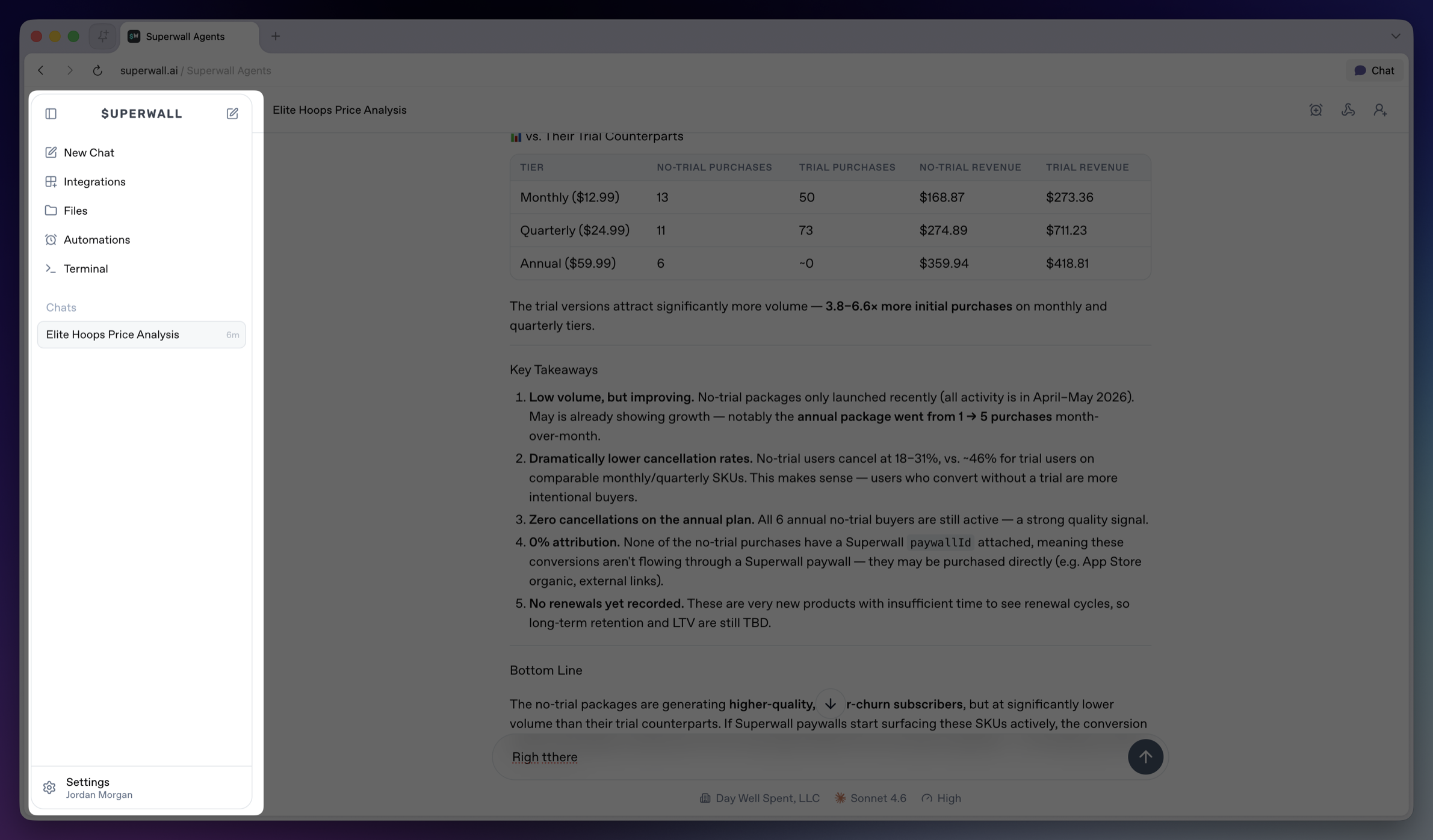 The sidebar is the main navigation for the workspace.
* **Collapse sidebar**: Hides the sidebar on desktop. Use the matching expand control to bring it back.
* **Top New Chat icon**: Returns to the new chat screen.
* **New Chat**: Opens the new chat screen and makes it the active sidebar item.
* **Integrations**: Opens account and tool connections, including GitHub, Slack, and Skills. See [Integrations](/docs/agents/integrations).
* **Files**: Opens the file browser for the active hosted machine. See [Files](/docs/agents/files).
* **Automations**: Opens scheduled prompts for chats. See [Automations](/docs/agents/automations).
* **Terminal**: Opens a terminal connected to the active hosted machine. See [Terminal](/docs/agents/terminal).
* **Chats**: Shows saved chats for the active workspace. Select a row to reopen a chat.
* **Settings**: Opens account, model defaults, environment variables, machines, usage, billing, webhooks, keybindings, and account controls. See [Settings](/docs/agents/settings).
The sidebar is the main navigation for the workspace.
* **Collapse sidebar**: Hides the sidebar on desktop. Use the matching expand control to bring it back.
* **Top New Chat icon**: Returns to the new chat screen.
* **New Chat**: Opens the new chat screen and makes it the active sidebar item.
* **Integrations**: Opens account and tool connections, including GitHub, Slack, and Skills. See [Integrations](/docs/agents/integrations).
* **Files**: Opens the file browser for the active hosted machine. See [Files](/docs/agents/files).
* **Automations**: Opens scheduled prompts for chats. See [Automations](/docs/agents/automations).
* **Terminal**: Opens a terminal connected to the active hosted machine. See [Terminal](/docs/agents/terminal).
* **Chats**: Shows saved chats for the active workspace. Select a row to reopen a chat.
* **Settings**: Opens account, model defaults, environment variables, machines, usage, billing, webhooks, keybindings, and account controls. See [Settings](/docs/agents/settings).